
Why AI Loves Hashtags and Asterisks in Articles
Simple Tricks to Make It Stop Forever

Made with the help of AI
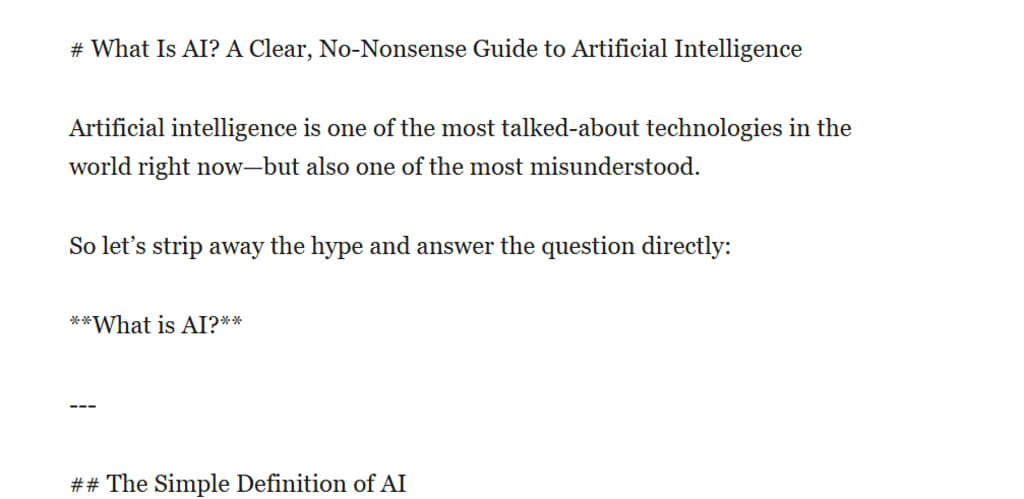
If you have ever asked an AI like Grok, ChatGPT, or Claude to write an article and received a wall of hashtags and stars, you are not alone. Almost every AI user notices the same thing: headings start with double or triple hashtags, bold text appears between double asterisks, and italics sneak in with single asterisks. It looks polished in some apps, but messy when you paste it into Vocal.media, Word, or a plain blog editor.
Here is exactly why AI does this, how it learned the habit, and the exact prompts and tricks that finally make it stop.
How AI Actually Uses These Symbols
AI models do not randomly add symbols. They are following a system called Markdown, the most popular lightweight formatting language on the internet.
A single hashtag followed by a space creates a big heading. Two hashtags create a smaller heading. Three hashtags create an even smaller one. Double asterisks turn words bold, and single asterisks make them italic. AI learned this pattern because it appears constantly in its training data from Reddit, GitHub, blogs, documentation, and millions of online articles.
When the model writes, it is not just producing words. It is trying to produce readable, professional-looking output. The symbols act like hidden instructions that tell the final screen how to display the text with headings, emphasis, and lists. In chat windows or preview modes that support Markdown, everything looks clean and structured. In plain text editors or publishing platforms that do not support it, the symbols become annoying clutter.
Why AI Cannot Resist Using Them
The main reason is simple: training data. AI models see far more Markdown-formatted text than plain paragraphs. Reddit threads, GitHub README files, technical blogs, and even many news sites use these symbols behind the scenes. The model quickly learns that readers and users prefer well-organized content, and Markdown is the fastest way to deliver that organization.
Another reason is helpfulness. AI is designed to be useful. It assumes you want scannable articles with clear headings and emphasis because that is what most people actually prefer when reading on phones or busy screens. The model is not trying to annoy you; it is trying to impress you by making the text look instantly professional.
Sometimes the habit also comes from safety and consistency. Using standard Markdown reduces the chance of the output looking like a messy block of text, which could feel low-quality to users.
When the Formatting Habit Becomes a Problem
For casual chat or brainstorming, the symbols are harmless and even helpful. But when you need clean copy for Vocal.media, newsletters, books, or client deliverables, those hashtags and asterisks become frustrating. They break the flow, force extra editing time, and can confuse some publishing platforms that treat the symbols literally instead of as formatting commands.
Tips and Tricks to Stop AI from Using Hashtags and Asterisks
The good news is you can almost completely eliminate this behavior with the right instructions. Here are the most effective methods that work across Grok, ChatGPT, Claude, and similar models.
First, give a strong plain-text rule at the very beginning of your prompt. A proven version reads:
Write the entire article in plain text only. Do not use any Markdown formatting. This means no hashtags for headings, no asterisks for bold or italics, no bullet points with dashes, and no other special symbols. Use simple paragraph breaks and natural sentence structure only.
For even better results, combine it with a role:
Act as a traditional print journalist writing for a magazine. Produce the full article in pure plain text with no digital formatting symbols whatsoever.
You can also add the rule at both the start and the end of your prompt to reinforce it. Some users copy the exact instruction into a custom system prompt or saved instruction set so they never have to repeat it.
Another powerful trick is to give a short example of the style you want. After your main instructions, add:
For example, the first paragraph should look like this: Artificial intelligence continues to change how we work and create content every single day.
This shows the model exactly what clean text looks like.
If the AI still slips in a few symbols, simply reply with:
Rewrite the previous article in strict plain text. Remove every hashtag, asterisk, and Markdown symbol.
Most models will correct it immediately on the second try.
Bonus Tips and Tricks for Better Control
You can actually choose the opposite approach when you want formatting. Add this line instead:
Format the article using proper Markdown with clear headings, bold text where needed, and bullet points for lists.
This is useful when you are posting to platforms that support rich text.
For long-term convenience, save your favorite plain-text instruction as a template or custom instruction in the AI interface. That way every new article starts clean without extra typing.
Some advanced users combine the rule with style preferences such as conversational tone, professional tone, or short paragraphs. The clearer and more specific your instructions, the fewer formatting surprises you will see.
Final Thoughts
AI uses hashtags and asterisks because it learned from the internet that these symbols make text easier to read and more professional. It is not a flaw; it is a side effect of trying to be helpful. Once you understand the pattern, controlling it becomes simple with one or two strong sentences in your prompt.
Next time you ask an AI to write anything for publication, start with the plain-text rule above. You will save editing time and get cleaner, more usable articles right from the first draft. The symbols are easy to turn on or off once you know the trick. Your readers will thank you for the clean, distraction-free text, and you will spend less time cleaning up after the AI.
About the Creator
Sandy Rowley
AI SEO Expert Sandy Rowley helps businesses grow with cutting-edge search strategies, AI-driven content, technical SEO, and conversion-focused web design. 25+ years experience delivering high-ranking, revenue-generating digital solutions.
Keep reading
More stories from Sandy Rowley and writers in 01 and other communities.
The Evolution of Custom Golf Apparel: Style Meets Performance on the Course
Golf has long been associated with tradition, precision, and a distinct sense of style. From the early days of the sport to the modern era, what players wear on the course has reflected both functionality and personal expression. Today, the rise of custom golf apparel has reshaped how golfers approach their wardrobe, blending performance technology with individuality in ways that were once unimaginable.
By charliesamuel3 days ago in 01
Robert Mueller : When Leadership Meets Loss: A Critical Reflection on Respect, Power, and Public Conduct
When Leadership Meets Loss: A Critical Reflection on Respect, Power, and Public Conduct Examining the Response to a Public Servant’s Death in a Polarized Political Climate
By Anthony Moriyam 7 days ago in 01
Chronic Ache in the Soul of a Single Parent
There is a chronic ache in the soul of a single parent. It lingers, feeling endless. This ache feels so difficult, especially when you look at other families. They seem so… whole. They seem so joyful and complete. There is a husband and a wife and children in a stroller. Thinking about your single state, you realize how awkward you feel, how out of place at various functions and gatherings. They are all happily together and you’re miserably alone. Disappointment with the current life circumstances just settles in to stay, or so it feels. How could these layers of disappointment be broken up anyhow?
By Rowan Finley 7 days ago in Humans




Comments (1)
and dashes